


Emoji Battery Icon Customize
4.4467.00 Reviews
App Specs
- Version
- 1.1.9
- Updated On
- License
- Free
- Downloads
- 10,000,000+
- Developer
- ZAppsolution
- Categories
- Personalization
- Platform
- Android
Screenshots
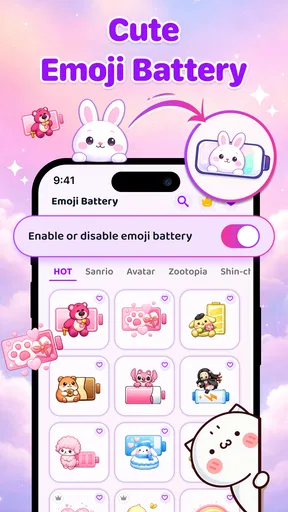
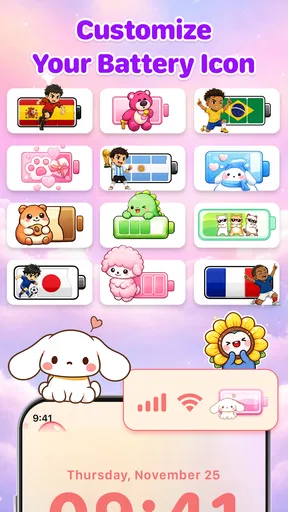
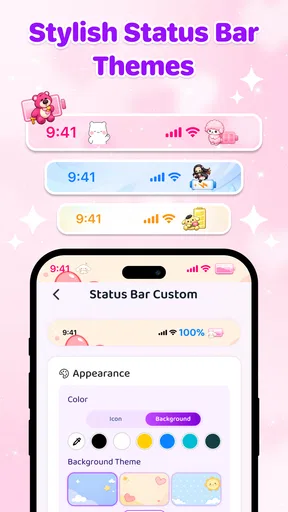
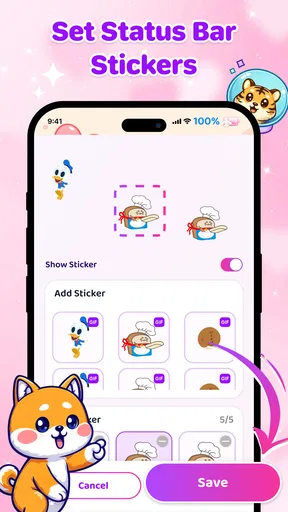
 Analysis by AppCompare
Ever wanted to give your phone's battery icon a little more personality? Well, that's exactly what Emoji Battery Icon Customize brings to the table! I recently downloaded this quirky app, and let me tell you, it’s a fun way to keep an eye on your battery level.
What to expect from an emoji-focused battery app
At its heart, this is a personalization app for people who would rather see a bit of character than the usual battery symbol. The idea is appealing if you check your status bar often and enjoy small visual changes that make a phone feel more personal. It is less about changing how the battery works and more about giving that everyday indicator a different look.
The developer is ZAppsolution, and the app is free to install, with optional in-app purchases priced from $2.99 to $7.99 per item. Its age rating is Everyone. Those details make it easy to decide whether it fits your budget and household, though I’d still treat any paid option as something to consider only after you’ve tried the free experience and know what you want from it.
It has a 4.4 average from around 10,000 ratings and has passed 100,000 installs. I see that as a useful sign that the concept has attracted users, not as a guarantee that it will behave identically on every phone. Status-bar appearance can depend on the device and Android version, so expectations should stay practical: the appeal is visual customization, not a replacement for the system’s battery tools.
First Impressions
When I first stumbled upon Emoji Battery Icon Customize, I was intrigued by the idea of replacing my standard battery icon with something more expressive. I mean, who doesn’t love a good emoji? The app was a quick download and didn’t take up much space, which is always a plus in my book.
Getting Started
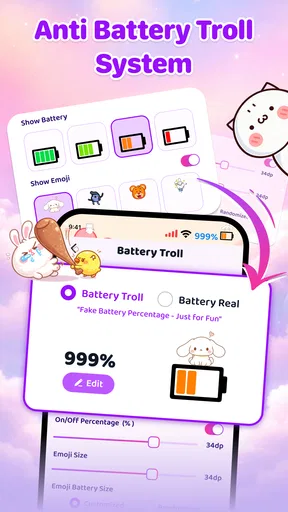
Setting up the app was a breeze. Once installed, you’re greeted with a user-friendly interface that guides you through the customization process. You can choose from a variety of emojis to represent different battery levels. From smiley faces when your battery is full to a sleepy emoji when it’s time to charge up, the options are both cute and clever.
The app itself doesn’t require any technical know-how, which is great because, let’s be honest, who has time for complicated setups? You just select your preferred emojis, and voilà, your battery icon is now full of character.
Worth Reading Before You Choose

Baby Panda World Brings Quick Play to Modern Phones, but Its Game Library Feels Busy

ESPN’s Live Game View Makes Following Close Games Easier

QuizzLand Review: A Good Fit for Short Trivia Breaks, Not Every Player

Basketball Stars: Multiplayer Is Fast, but Can It Recover When Matches Go Wrong?

WEBTOON Turns Phone Updates Into a Better Reading Routine

Link to Windows Runs on Shared Habits, Not Social Feeds
A sensible first setup
For a first-time user, I’d approach setup with one clear goal: make the battery easy to read before trying to make it elaborate. Pick a visual style you can recognize at a glance, then check how it looks against your usual status-bar background. A design that is charming on a setup screen may be less useful when it is reduced to the tiny space beside your notifications.
It also helps to think about what you want the visual changes to communicate. If you want a quick warning as your charge gets low, choose a sequence that feels noticeably different across levels rather than a collection of similar-looking icons. The point is not to create the most elaborate arrangement; it is to make the change meaningful when you are busy and only glance at your phone.
One practical trade-off is that expressive symbols can be less immediately legible than a familiar battery outline. If you share a phone screen during work or rely on quick glances while travelling, clarity matters more than novelty. I’d keep the system’s usual battery information available as a reference while deciding whether the customized look is genuinely helping.
Customization Galore
What I really enjoy about this app is the extensive customization options. Not only can you choose emojis, but you can also adjust their size and position. This means you can tailor the look to fit your personal style or mood. I spent a good chunk of time just playing around with different combinations, and it was surprisingly satisfying.
Another neat feature is the ability to set different icons for different battery percentages. You can have a series of emojis that change dynamically as your battery drains, making it both functional and entertaining.
Making the first change useful
My advice is to test a small set of distinct symbols rather than spend the first session designing a long sequence. A simple progression gives you a clearer sense of whether the changing indicator works for your routine. If you often notice your battery only when it is nearly empty, make the low-charge state the most obvious one; if you check often, a more gradual visual progression may suit you better.
There is a useful everyday scenario here: imagine heading out with a busy morning ahead, glancing at your status bar while replying to a message, and spotting a change that tells you it is time to charge before leaving. The customization can make that glance more engaging, but it should not replace the habit of checking the actual percentage when you need to plan carefully. For a long trip or a day away from a charger, dependable information beats a cute icon.
Another small workflow tip is to change one aspect at a time. If you adjust the design, position, and sequence all together, it can be hard to tell which choice made the result easier or harder to read. A brief test with one change at a time gives you a better chance of ending up with a setup you will keep rather than one you abandon after the novelty wears off.
Performance and Usability
In terms of performance, Emoji Battery Icon Customize runs smoothly without any noticeable impact on battery life, which is always a concern with customization apps. The emojis appear crisp and clear, and the app integrates seamlessly with the system UI.
Usability-wise, it's straightforward. The intuitive design means you won’t find yourself scratching your head, trying to figure out how to make adjustments. It's a "set it and forget it" kind of app, which is perfect for those who want something simple yet effective.
Compatibility and common confusion
The current version is 1.0.14, and the minimum operating system requirement is Android 8.0. If your phone runs an older version, this app is not the right fit. If it meets the requirement but the visual result differs from what you expected, first check the settings you selected and look at the status bar in more than one situation, such as on a bright screen and a darker one.
A common point of confusion with this kind of customization is expecting a new icon to provide more precise battery information than the phone itself. The emoji is a visual cue, not a reason to ignore the percentage or the device’s normal battery screen when accuracy matters. Likewise, people sometimes expect every app or screen to display a customized status bar in exactly the same way. The practical test is whether the indicator remains clear in the places where you usually look at it.
If the status bar already feels crowded, an additional decorative element may not improve the experience. Notifications, network indicators, and other system symbols compete for limited space. In that situation, I would prioritize quick readability and use a simpler style—or stick with the standard battery display—rather than keep adjusting a design that makes the top of the screen harder to scan.
Who will enjoy it, and who may prefer another option
I’d recommend this app to someone who likes customizing small parts of a phone, enjoys emoji, and wants a more playful way to notice battery changes. It makes the most sense for people who are comfortable experimenting with appearance and who do not need the status bar to stay as plain and information-dense as possible.
It is less suited to anyone who values a minimal interface, finds emoji harder to interpret than a standard battery symbol, or wants advanced battery monitoring rather than a cosmetic change. For deeper information about battery use, charging, and apps consuming power, the phone’s built-in battery settings are the more appropriate place to look. For a straightforward replacement look without extra visual personality, a conventional system option or a simpler theme may be a better match.
That comparison is important because battery customization tools can serve different purposes. The usual system display favors familiarity and fast recognition; a themed approach favors personal style. This app’s central attraction is the second choice. I would not install it expecting it to improve battery capacity, extend charge, or solve power-drain problems—the benefit is in how the indicator looks and how enjoyable it is to check.
Why You’ll Love It
If you’re like me and enjoy adding a touch of whimsy to your tech, this app is right up your alley. It’s a small change, but it brings a smile to your face every time you check your battery status. Plus, it’s a great conversation starter when someone notices your unique battery icon.
With Emoji Battery Icon Customize, you get a delightful blend of utility and fun. It’s a refreshing way to interact with your device, making the mundane task of monitoring battery life a bit more enjoyable.
Choosing whether to keep it
I’d give the customized look a little time before deciding whether it belongs on your phone. The first few checks can feel fun simply because the display is new; after that, ask yourself whether the symbols still help you spot battery changes quickly. If they do, the app has earned its place. If you find yourself opening settings repeatedly or switching back to the standard indicator, that is a good sign that a simpler option fits your habits better.
The free starting point makes that decision less complicated: try the basic experience first, then consider any optional purchase only if you have a clear reason to do so. In-app items range from $2.99 to $7.99, so it is sensible to decide what you value before spending. The app is best approached as a small personalization choice, not something you need to pay for to solve a battery problem.
For someone buying or setting up a phone for a family member, the Everyone age rating is reassuring, but the more useful question is whether that person will understand the icon at a glance. A playful display can be fun for a confident smartphone user; for someone who depends on the clearest possible battery cue, the default display may be easier. Matching the setup to the person matters more than choosing the most decorative option.
Final Thoughts
Overall, Emoji Battery Icon Customize is a charming little app that adds a playful twist to your phone’s interface. Whether you’re a fan of emojis or just looking for something to spice up your home screen, this app is worth a try. It’s simple, effective, and best of all, it makes your phone feel a little more like you.
So, go ahead, give it a download and let those emojis brighten up your battery icon today!
Pros
- Highly customizable interface options.
- Easy to use with intuitive controls.
- Lightweight
- doesn't drain battery.
- Supports a wide range of emoji styles.
- Regular updates with new features.
Cons
- Limited free customization options.
- Ads can be intrusive for some users.
- Premium features are costly.
- Occasional bugs with certain emojis.
- Lacks detailed tutorials for beginners.
FAQs for Emoji Battery Icon Customize
What is Emoji Battery Icon Customize and how does it work?
Emoji Battery Icon Customize is an app designed to personalize your battery icon using a variety of emojis. Once installed, it allows you to select from a wide range of emojis to replace the standard battery icon on your device's status bar, providing a fun and unique way to display your battery level.
Is Emoji Battery Icon Customize compatible with all devices?
The app is primarily designed for Android devices and may not be fully compatible with all models or versions. It’s essential to check the app description on the download page to ensure compatibility with your specific device. iOS users may have limited functionality due to system restrictions.
Are there any security concerns with using Emoji Battery Icon Customize?
Emoji Battery Icon Customize requires access to certain system permissions to function properly. It’s crucial to download the app from reputable sources like Google Play Store to avoid security risks. Always review permissions before installation to understand what data the app can access or modify.
Does using Emoji Battery Icon Customize affect battery performance?
The app is designed to have minimal impact on battery performance. It only changes the visual aspect of the battery icon and does not interfere with the device's battery consumption. However, running multiple customization apps simultaneously might have a cumulative effect on performance.
Can I revert to the original battery icon after using the app?
Yes, you can easily revert to the original battery icon. The app typically includes an option to restore the default system icon. If you encounter any issues, uninstalling the app will automatically revert the changes, restoring your device’s default settings.


